Travel Keynote Template: Your Passport to Stunning Presentations
Why Your Next Presentation Needs a Professional Travel Template
As someone who has sat through countless pitches and keynotes, I can tell you that the difference between a forgettable slideshow and a memorable presentation often comes down to the design assets you choose. You have great ideas, but if you present them on a generic white background with bullet points, you lose the audience's imagination. This is exactly why the Travel Keynote Template exists. It isn't just a collection of slides; it is a carefully curated canvas designed to transport your viewers to exotic locations before you even speak. For agencies, tour operators, and bloggers, this template acts as a visual bridge, connecting your narrative to the viewer's desire for exploration.
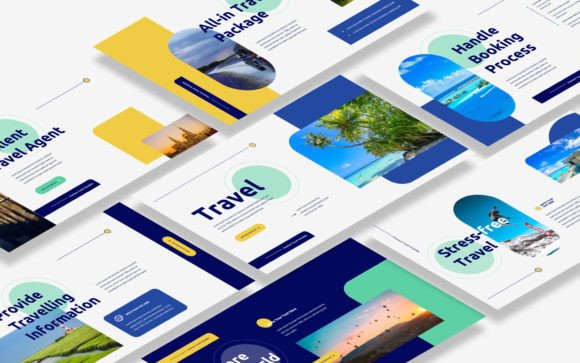
The personality of this template is best described as immersive and clean. It avoids the chaotic, scrapbook style that plagues many travel designs. Instead, it relies on a modern typography approach, utilizing ample white space to let high-quality photography breathe. The visual hierarchy is established through bold headings and structured layouts, ensuring that whether you are displaying a safari itinerary or a beach resort brochure, the information is digestible. It projects an air of professionalism and wanderlust simultaneously, which is a difficult balance to strike but essential for building trust in the travel industry.
Visual Characteristics and Design Flexibility
When you open the file, you will notice that the Travel Keynote Template is built on a foundation of versatility. It offers 30 distinct slides, which is a sweet spot—enough variety to cover a full business proposal without overwhelming you with redundant layouts. The aspect ratio is 16:9 widescreen, which is the current standard for most projectors and monitors, ensuring your content looks sharp and contemporary. One of the most practical features is the use of picture placeholders. You don't need to be a design wizard to make this look good. The "drag and drop" functionality means you can swap out the demo images with your own photography in seconds, and the layout will automatically adjust to fit.
Regarding the typography integrated into the slides, the template recommends and uses free web fonts. This is a massive practical benefit for small business owners and freelancers. You won't need to purchase expensive premium font licenses just to edit your presentation. The font choices included in the documentation are clean sans-serif options that pair well with the imagery. They provide excellent readability, even from the back of a conference room. If you decide to customize the text further, you have the freedom to experiment with font pairing. For instance, you could pair the included sans serif font with a script font for decorative headers to add a touch of elegance, or use a bold display font for impact on your title slide.
Practical Applications Beyond the Boardroom
While the primary function is clearly for Keynote presentations, thinking of this template merely as a slideshow tool limits its potential. View these slides as a library of design assets. A creative marketer can easily repurpose these layouts for other mediums. For example, the slide designs are perfect for creating social media graphics. You can export individual slides as high-resolution images to use as Instagram stories or Facebook posts that maintain your brand identity. The consistent color schemes and grid systems provided in the template ensure that your digital marketing materials look cohesive, which is vital for brand recognition.
Furthermore, the structure of the Travel Keynote Template is ideal for editorial design. If you are a travel blogger looking to create a media kit or a PDF guide for your subscribers, you can adapt the slides into a vertical format. The clean lines and structured grids make it easy to arrange text and images for a digital magazine layout. It is also an excellent starting point for packaging design concepts. Imagine using the slide layouts to mock up a new luggage tag or a travel accessory box. The template provides the visual language of "adventure" and "luxury" that you need to test these concepts before moving to production.
Tips for Customization and Brand Consistency
To get the most out of the Travel Keynote Template, you need to approach the editing process with your specific audience in mind. The template is based on Master Slides, a feature that is often underutilized. I highly recommend editing the Master Slides first if you plan to use this template repeatedly. By updating your logo, brand colors, and preferred typeface in the Master Slide view, you ensure that every single page of your presentation adheres to your brand identity automatically. This saves you hours of manual tweaking and prevents the "Frankenstein" effect where different slides look like they came from different companies.
When selecting your own images to replace the placeholders, pay attention to the lighting and mood of the existing demo graphics. The template is designed with a specific visual flow in mind. If you swap a bright, airy beach photo for a dark, moody forest image, you may need to adjust the text color to maintain readability. This is where the "easily editable" nature of the template shines. You can quickly change text from dark grey to white or add a semi-transparent overlay to an image to ensure your message isn't lost. Remember, the goal is to inspire your audience, not to make them squint to read your itinerary.
Finally, consider the narrative arc. A travel presentation is a story. Use the introduction slides to set the scene—perhaps using a full-bleed image with a handwritten font overlay for a personal touch. Move into the body slides with data, itineraries, and logistics using clean, legible typography. End with a strong call to action. By utilizing the full range of the 30 slides provided, you can take your clients on a journey that feels complete and professionally curated. Whether you are pitching a luxury honeymoon package or a rugged mountain trek, this template gives you the visual credibility to close the deal.